In our daily digital lives, the desktop is our home base. For many, it's a chaotic mess of icons, folders, and distracting backgrounds. We crave simplicity and order, yet we also desire something visually striking. What if your desktop could be both? What if it could be a perfect fusion of mathematical precision and modern aesthetics?
Enter the
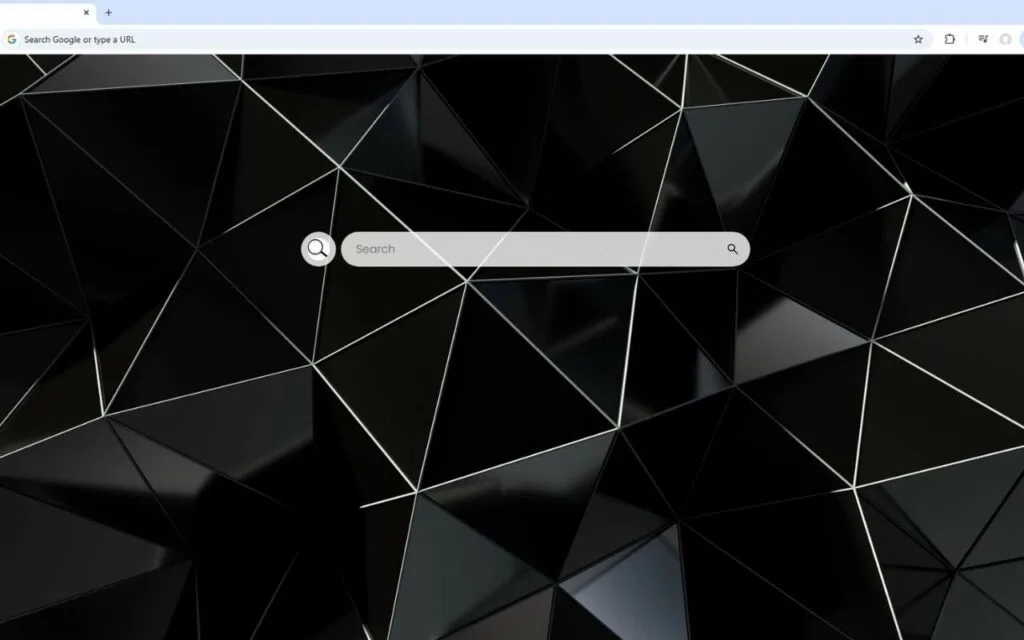
Polygons Live Wallpaper. This isn't just another background; it's a sophisticated piece of digital art. It showcases a stunning array of triangular polygons in varying shades of obsidian, onyx, and charcoal, meticulously arranged to create a multifaceted three-dimensional surface. Clean white lines delineate each facet, providing structure and definition.
What elevates this design beyond simple geometry is its masterful use of light. Subtle, dynamic reflections gleam across the textured surface, as if the polygons are a premium, physical material responding to an ambient light source. This interplay of deep black planes and gleaming highlights is the height of understated elegance.
But the true genius of this
Polygons Live Wallpaper is that its beauty is not just skin-deep. Fused into this minimalist art is a powerful, interactive dashboard, turning your desktop from a passive canvas into an active command center.
What is its Origin? The Rise of Geometric Design
The powerful appeal of this
Polygons Live Wallpaper isn't an accident. It's the culmination of a design trend that has been evolving for decades, moving from a technical limitation to a celebrated, high-end aesthetic.
From 3D Modeling to Mainstream Art
The "faceted" or "low-poly" look has its roots in the early days of 3D computer graphics.
- A Technical Necessity: In the 1990s, video games (like Star Fox or Virtua Fighter) used a "low-poly" count (a low number of polygons) because computer hardware simply couldn't render complex, smooth surfaces in real-time. This created a distinctive, blocky, geometric look.
- An Aesthetic Choice: As technology improved, "photorealism" became the goal. But in the 2010s, artists and designers began to look back at the "low-poly" style, not as a limitation, but as a clean, minimalist, and expressive art form. They embraced the sharp edges, the clean facets, and the abstract nature of geometric shapes.
This
Polygons Live Wallpaper represents the peak of this evolution. It's not "low-poly" in a retro, blocky sense. It's
sophisticated. It uses the "faceted" 3D surface, but renders it with advanced lighting and premium "materials" (the obsidian and onyx) to create something that feels futuristic and luxurious, not nostalgic.
The Psychology of Precision and Order
Why are we so drawn to this
Polygons Live Wallpaper? Humans are wired to find comfort in patterns, structure, and order.
- A Sense of Calm: A chaotic, cluttered desktop can contribute to a cluttered, stressed mind. The clean white lines and repeating triangular polygons of this design create a sense of structure, calm, and intelligence. It’s the visual equivalent of a clean, organized workspace.
- The "Premium" Feel: The deep, rich blacks (obsidian, charcoal) combined with the subtle, dynamic light reflections give the impression of a high-tech, premium material. It's the aesthetic of a luxury car's interior, a high-end audio system, or modern architecture. It makes your digital space feel valuable and sophisticated.
Why is This Polygons Live Wallpaper So Popular?
The popularity of this specific theme comes from its "dual-core" design: it perfectly satisfies the desire for both minimalist beauty and maximum function. It’s a rare product that is both a "wow"-factor centerpiece and a silent, productive partner.
A Perfect Fusion of Minimalism and "Wow Factor"
Many "minimalist" wallpapers are just solid colors or simple gradients. They're clean, but they're
boring. On the other hand, many "live" wallpapers are overly busy—full of distracting animations and bright colors.
The
Polygons Live Wallpaper finds the perfect middle ground.
- It's Not "Boring": The key is the dynamic lighting. As a live wallpaper, the gleam and reflections can shift subtly as you move your mouse or as time passes. This makes the desktop feel responsive and alive, not static.
- It's Not "Loud": The monochromatic black palette is professional and elegant. It provides a perfect, non-distracting backdrop for your actual work (documents, browsers, etc.). It’s a Polygons Live Wallpaper that looks just as good in a creative studio as it does in a corporate office.
This theme is for the user who appreciates the elegance of a black suit, the precision of a luxury watch, or the clean lines of a modern skyscraper.
Beyond the Art: The Interactive Dashboard
This is the feature that converts admirers into daily users. The
Polygons Live Wallpaper isn't just something to look at; it's something you
use. It integrates a full productivity suite directly into its geometric design, allowing you to finally hide that messy grid of desktop icons.
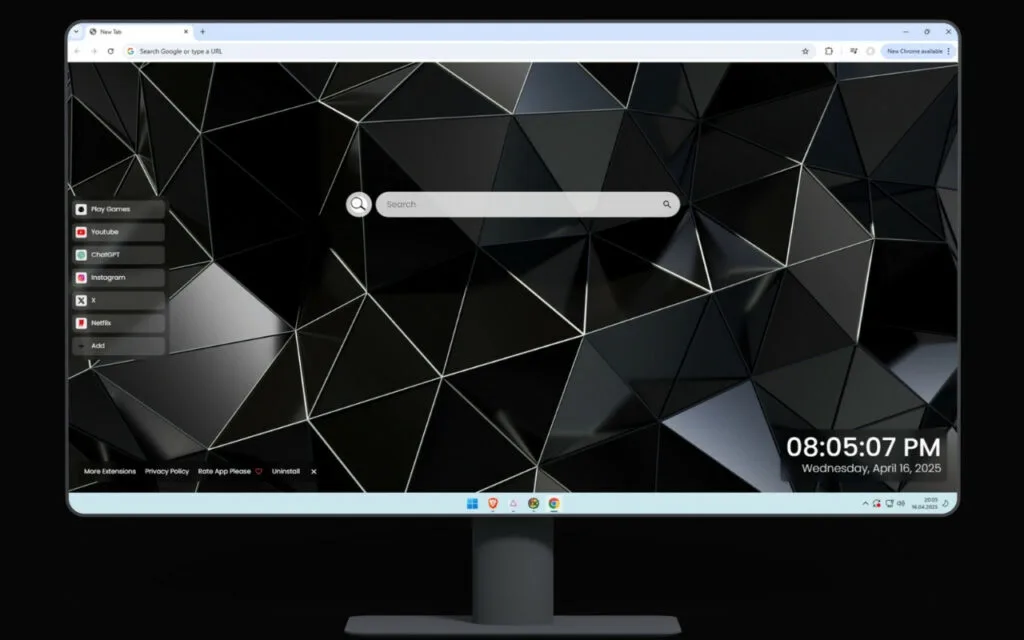
The interactive dashboard features:
- 🔗 Quick Access Shortcuts: Pre-configured links to your most-used sites like YouTube, Netflix, ChatGPT, and more.
- ➕ Custom Shortcuts: The key to true minimalism. You can add your own favorite websites, project folders, or applications with clean, simple icons.
- 🔍 Search Bar: A minimalist search bar that is seamlessly connected to your default search engine, integrating browsing into your desktop.
- 🕒 Clock & Date: A modern, clean typography display of the current time and date that perfectly matches the wallpaper's aesthetic.
- 🎮 Play Games: A built-in entertainment module for quick, light browsing breaks.
This functional hub is what makes this
Polygons Live Wallpaper so revolutionary. It takes the core philosophy of the art—order, precision, and intelligence—and applies it to your workflow.
How to Curate Your Own Geometric Desktop
If you're a "collector" of digital themes or have been inspired to build your own perfect, minimalist setup, this
Polygons Live Wallpaper is the ultimate centerpiece. Here’s how to take it to the next level.
Tips for Collectors: Building a Cohesive Desktop
A truly immersive desktop is all about
harmony.
- Match Your OS Theme: This is the first step. Go into your Windows or macOS settings and change your system "accent color." A neutral graphite, white, or dark mode will make your menus and taskbar feel like a native part of the Polygons Live Wallpaper.
- Harmonize Your Icons: While the ➕ custom shortcuts feature hides most icons, you can use a minimalist, monochrome icon pack for any system icons that remain. Look for "white line art" icon packs to perfectly match the "clean white lines" of the wallpaper.
- Choose Your Fonts: The right typography is crucial for a modern aesthetic. Set your system font to a clean, sans-serif option like Inter, Roboto, Helvetica, or Montserrat. This will make your 🕒 clock widget and all system text feel cohesive.
DIY vs. All-in-One: A Comparison
You have options when it comes to customizing your desktop. This table breaks down why a fully interactive, all-in-one theme like this
Polygons Live Wallpaper is a significant upgrade over other methods.
| Customization Method |
How It Works |
Best For... |
Customization Level |
| Static Wallpaper |
A single .jpg or .png image of polygons. |
Simplicity and zero resource use. |
Low (Just the image) |
| Animated Wallpaper |
A looping video/animation (e.g., from Wallpaper Engine). |
Ambiance (shifting light). |
Medium (Visuals only) |
| DIY Interactive Desktop |
Using Rainmeter (a free tool) to layer custom "skins" (widgets for 🕒, 🔍, etc.) over a static or animated wallpaper. |
Tech-savvy DIY users and tinkerers who want total control. |
Extremely High (but complex) |
| All-in-One Theme |
This Polygons Live Wallpaper (a single, pre-packaged theme that includes the art and all interactive widgets). |
Users who want a perfect, professional, "it just works" solution instantly. |
Medium (Easy & Streamlined) |
Conclusion: Your Desktop, Redefined by Design
The
Polygons Live Wallpaper is more than just a background. It's a statement. It's a choice to bring order, sophistication, and intelligence to your digital life. It proves that our desktops don't have to be a choice between a boring, functional tool and a distracting, beautiful toy.
By fusing the timeless appeal of mathematical geometry with a powerful and practical suite of tools (🔗, ➕, 🔍, 🕒, 🎮), this
Polygons Live Wallpaper transforms your digital workspace. It becomes a place of calm focus, high-tech elegance, and seamless productivity.
What does your ideal desktop look like? Do you prefer minimalist geometry like this, or a vibrant, natural scene? Share your thoughts in the comments below!