In our busy digital lives, the desktop is our home base. Too often, it’s a chaotic landscape of icons and files. But what if your desktop could be a destination? What if it could be a journey into a tranquil winter wonderland, where celestial magic illuminates the night?
This is the promise of the
Winter Falling Star Live Wallpaper, a breathtaking piece of interactive art that redefines the desktop experience.
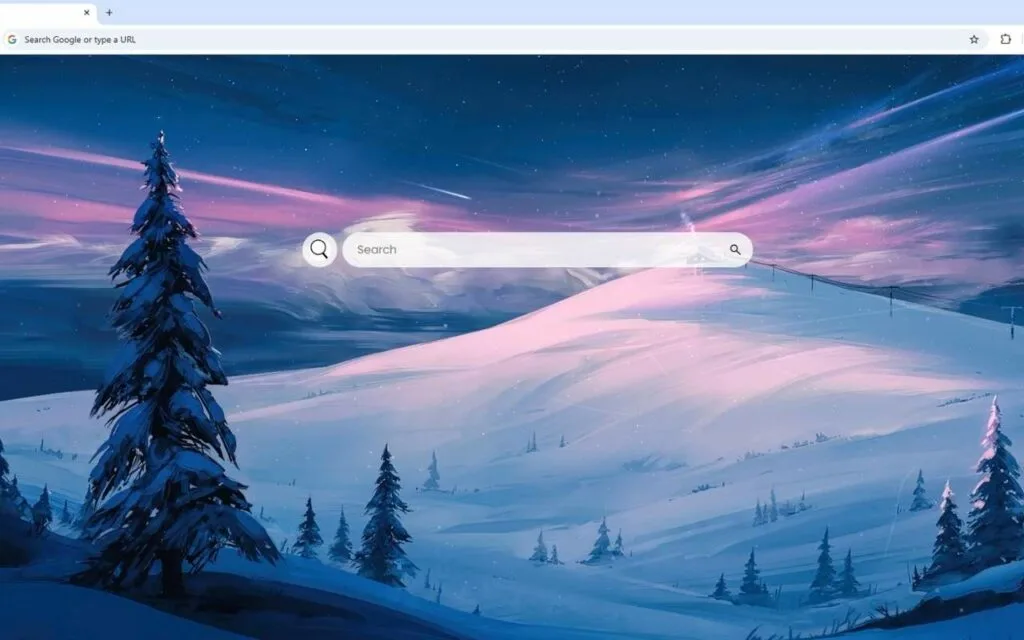
The scene it paints is one of profound, serene beauty. It captures a snow-blanketed landscape, with rolling hills of pristine snow creating gentle waves of white and soft blue. Majestic evergreen trees stand as silent sentinels, their dark silhouettes a perfect contrast to the luminous snow. In the distance, a small cabin perches on a hill, its windows glowing with warm light—a tiny beacon of comfort amid the vast winter solitude.
But the true majesty unfolds above. The deep blue night sky transforms into sweeping ribbons of pink and purple aurora-like light. A bright comet streaks across the heavens, leaving a trail of stardust. A full moon casts its silvery glow over the entire panorama.
This
WinterFalling Star Live Wallpaper is more than just a beautiful view; it's a powerful, functional dashboard. Why has this specific blend of digital art and productivity become so popular? Let's explore the origin of this trend and how this theme brings magic to your workflow.
The Origin of the "Digital Sanctuary"
The overwhelming appeal of this
Winter Falling Star Live Wallpaper isn't just about pretty pictures. It taps into deep-seated psychological needs: the desire for both the "sublime" and the "cozy."
The Psychology of "Cozy Solitude"
This wallpaper is a masterclass in balancing two powerful concepts.
- The Cozy (Hygge): The small cabin with its warm, glowing windows is a powerful symbol. It represents safety, warmth, and "hygge"—a Danish concept of cozy contentment. It's the feeling of being sheltered from the cold.
- The Sublime: The rest of the scene—the vast, untouched snow, the infinite night sky, the aurora, and the streaking comet—inspires a sense of awe. This is "the sublime," an emotion of wonder and beautiful insignificance when faced with the grandness of nature.
This
Winter Falling Star Live Wallpaper provides both. You aren't lost in the cold; you are a safe, warm observer of the celestial magic. This is a powerful psychological combination that, according to studies on environmental psychology, can reduce stress and promote a state of calm focus.
The Evolution from Static Image to Living World
For decades, a "wallpaper" was a static
.jpg. Then came animated wallpapers—simple video loops of rain or a fireplace. This
Winter Falling Star Live Wallpaper represents the next generation. It's an
interactive environment.
The snow isn't just a picture; it feels cold and soft. The aurora isn't a 10-second loop; it feels like a living, breathing phenomenon. The comet (the "falling star") isn't just an animation; it's an
event that brings the sky to life. This evolution from a passive background to an active, living world is why users are no longer satisfied with simple images. They want an experience.
Why is This Winter Falling Star Live Wallpaper So Popular?
The popularity of this theme comes from its brilliant fusion of form and function. It solves two problems at once: it provides a stunning, "wow-factor" visual while simultaneously decluttering your desktop and boosting your productivity.
A Perfect Blend of Magic and Utility
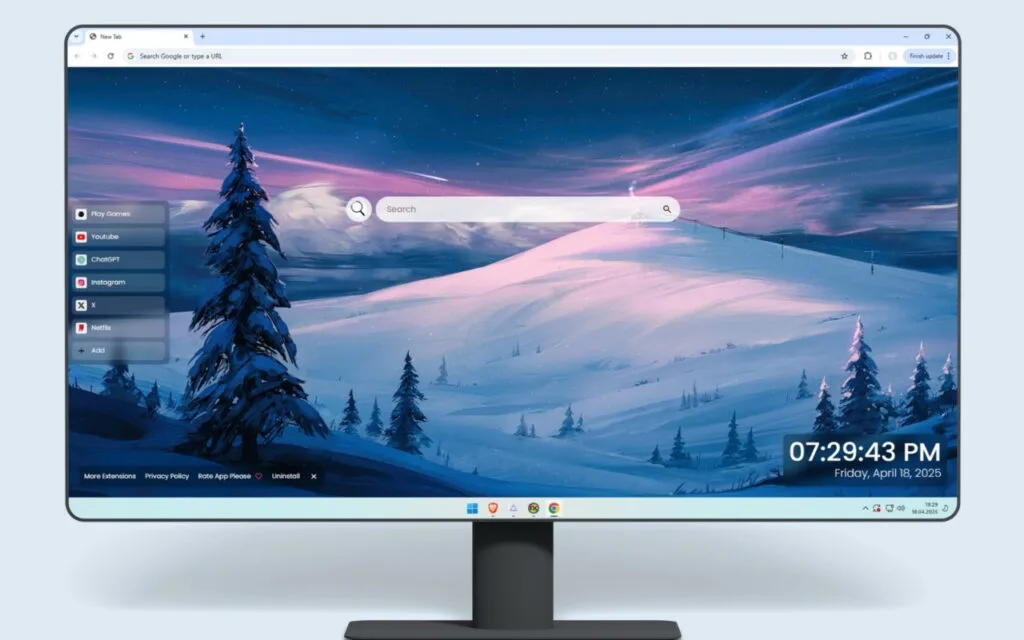
This wallpaper isn't just art; it's a tool. It integrates a clean, minimalist, and highly functional dashboard directly into the magical landscape. This "aesthetic productivity" approach is a major trend, as users want their digital tools to be as beautiful as they are functional.
The integrated dashboard features:
- 🔗 Quick Access Shortcuts: Pre-configured links to your most-used sites like YouTube, Netflix, ChatGPT, and more.
- ➕ Custom Shortcuts: The real power move. You can add your own favorite websites, project folders, or applications, keeping your desktop free of icon clutter.
- 🔍 Search Bar: A simple, elegant search bar that connects to your default search engine, integrating your browsing workflow directly into the desktop.
- 🕒 Clock & Date: A modern, clean display of the time and date, designed with typography that matches the wallpaper's serene aesthetic.
- 🎮 Play Games: A built-in entertainment module for quick, light browsing breaks, perfect for a mental reset.
This
Winter Falling Star Live Wallpaper is popular because it delivers this dual value. It's a "wow" moment for anyone who sees it, but it's also a genuine upgrade to your daily computer use. Have you ever wished your beautiful wallpaper could actually
do something?
The "Aesthetic Desktop" Trend
Data from platforms like Pinterest and Reddit shows a massive surge in searches for "aesthetic desktop," "cozy desktop setup," and "aurora wallpaper." Users are curating their digital spaces as extensions of their personalities.
This
Winter Falling Star Live Wallpaper is the perfect centerpiece for such a setup. It’s not just a background; it’s the main attraction. The dynamic elements—the streaking comet and the shimmering aurora—make the desktop feel alive and far more engaging than a static image ever could.
How to Curate Your Own Celestial Winter Theme
Seeing this stunning setup often inspires users to create their own. Whether you're a "collector" of digital themes or a DIY enthusiast, here’s how you can achieve this harmonious and magical look.
Tips for Collectors: Building Your Theme
If you're using this
Winter Falling Star Live Wallpaper as your base, you can enhance the immersion by harmonizing your entire operating system with it.
- Match Your OS Palette: Go into your Windows or macOS settings and change your system "accent color" to a complementary cool blue, deep purple, or a neutral dark gray to match the night sky.
- Harmonize Your Icons: Don't let default yellow folder icons ruin the magic! Use a minimalist icon pack (many are available online) to change your main icons to a clean, white, or silver set that blends with the snow.
- Add Ambient Sound: For the ultimate immersive experience, pair this visual wallpaper with a quiet, looping audio track of "gentle winter wind" or a soft, crackling fireplace sound (to match the cabin).
DIY vs. All-in-One: A Feature Comparison
You can achieve this look in two ways: by finding an all-in-one, pre-packaged theme like this
Winter Falling Star Live Wallpaper, or by building it yourself using different tools.
| Customization Method |
How It Works |
Best For... |
Customization Level |
| Static Wallpaper |
A single .jpg or .png image of a winter scene. |
Simplicity and zero resource use. |
Low (Just the image) |
| Animated Wallpaper |
A looping video/animation (e.g., from Wallpaper Engine). |
Users who want the visuals (aurora, falling star) but not the widgets. |
Medium |
| DIY Interactive Desktop |
Using Rainmeter (a free tool) to layer custom "skins" (widgets for 🕒, 🔍, etc.) over an animated wallpaper. |
Tech-savvy DIY users who want total, granular control over every detail. |
Extremely High |
| All-in-One Theme |
A single, pre-packaged theme (like this Winter Falling Star Live Wallpaper) that includes the art and all interactive widgets. |
Users who want a perfect, professionally designed, "it just works" solution. |
Medium (Easy setup) |
Your Desktop, Your Magical Sanctuary
The
Winter Falling Star Live Wallpaper is more than just a theme. It's a digital sanctuary, a productivity tool, and a stunning piece of celestial art all in one. It captures the perfect balance between the cozy comfort of a warm cabin and the awesome, sublime beauty of a magical winter night.
By seamlessly integrating a full suite of productive tools (🔗, ➕, 🔍, 🕒, 🎮) into this breathtaking landscape, it proves that our digital workspaces don't have to be sterile or chaotic. They can be inspiring, peaceful, and perfectly functional. It’s an upgrade not just for your desktop, but for your entire workflow.
What does your ideal "desktop sanctuary" look like? Would it be a winter night, a summer beach, or a futuristic city? Share your thoughts in the comments below!